For allied health practices
We’ll make your practice AI-native and give your team back 20 hours of admin a week. Within 90 days. Guaranteed.
Every practice leaks time in different places. We find where yours goes, whether that’s typing up referrals, writing reports for GPs and funders, reconciling Medicare and NDIS claims or answering the phones, then build the fix around how your practice works. One job at a time, with the hours measured. That’s about $40,000 a year of admin time back into patient care.
Book a 20-minute call
We’ll look at how your practice runs and tell you honestly whether 20 hours is there.
50+
products shipped
300,000+
people use software we built
5.0
on Clutch
Excellent
rating on Trustpilot
Why AI stalls
Every practice knows AI should be doing more of the work. Almost nobody knows where to put it.
You’ve seen the demos. Maybe your clinicians already use an AI scribe for notes. But the rest of the practice still runs the way it did five years ago: a referral retyped from a fax, a report to the GP written after hours, a claim matched by hand, and a front desk that spends the day on the phone.
The problem isn’t the tools. It’s that nobody has the time to sit inside your practice, work out which jobs can be handed to software, and then actually build it and switch it on.
That’s the job we do. We come in as your practice’s technology team, find the hours, build the fix, and measure the result. Your clinicians keep doing the clinical work. The repetitive work goes away.
See it working
Three examples of what a custom build can do
Example screens on a sample practice with made-up patients, not a package we sell. Your build starts with your practice: we find where your hours actually leak, then build the fix for that, around the software you already use.
01
Reports and letters
Today
A clinician rereads 22 session notes, the outcome measures and the plan, then writes the NDIS progress report after the last patient.
With a custom build
The draft comes from the whole case file, and every sentence links to the note it came from. The clinician confirms anything flagged, then signs.
The reports screen. Anything the system isn’t sure of is flagged for the clinician.
02
Referrals
Today
Reception reads faxes and emails, types the details in, chases the GP for what’s missing and plays phone tag to book.
With a custom build
The letter is read straight into the patient’s file. Unclear details and gaps go to a person, the GP gets a request, and the patient books by SMS.
The referrals screen. Anything under 90% confidence waits for a person to check.
03
Claims and plans
Today
Someone ticks off the NDIS bulk payment line by line, then works out why four claims came back unpaid.
With a custom build
Payments are matched to invoices automatically. Each rejection comes with the likely reason and the fix, and plans running low are flagged before the money runs out.
The claims screen. Only the exceptions reach a person.
We don’t hand you our system. We find your leak and fix it.
Every practice loses hours in different places. In the first 14 days we time how yours really runs and find the biggest leak. Then we build the fix around your team and your practice software, whether it’s one of the jobs above or something else entirely.
Find your practice’s leak
Quick check
Roughly how many hours is your practice losing?
Move the sliders. This is a rough estimate, not a measurement. The real number comes from the 14-day timing.
The work we take off your team
Six jobs where the hours hide
These are the jobs where the hours hide in most practices. We start with whichever ones cost you the most.
Referral intake
Referrals arrive by fax, email and secure messaging. Someone retypes each one into your practice system and chases the missing care plan.
Referrals are read and filed against the patient automatically, missing details are flagged, and plan expiry dates are tracked.
Reports and letters
GP letters, NDIS progress reports and WorkCover updates get written from scratch, usually after the last patient has gone.
A draft is ready from the session notes and the right template. The clinician reads, edits and signs it.
Claims and payments
Medicare, NDIS, DVA, WorkCover and health fund payments are matched against invoices by hand, and rejected claims slip through.
Payments are reconciled into Xero or MYOB automatically. Your team only sees the claims that failed or are still unpaid.
New patient intake
Forms, consent, Medicare and funding details are collected over the phone and on paper, then typed in.
One link before the first visit. Forms, consent and funding details are collected and filed before the patient walks in.
Cancellations and recalls
A cancellation means ringing down the waitlist. Gaps stay empty and recalls go out when someone remembers.
Cancelled slots are offered to the waitlist automatically and recalls go out on schedule. Your front desk steps in only when a patient needs a person.
Answering the same questions
“Do I need a referral?”, “What’s the gap?”, “Can you resend my invoice?” Each call pulls your front desk away from the patient in front of them.
Patients get answers by SMS, email or phone from an assistant that knows your practice. Your front desk handles the conversations that matter.
What that’s worth: no next receptionist, more appointments on the same team, and your clinicians’ evenings back.
Let’s look at your practice’s workflow
How the engagement works
A team that builds it into how your practice runs
This isn’t software you buy. It’s a team that comes in, finds where the hours go, and builds the fixes around how your practice actually runs, on top of the tools you already pay for. One fixed price, quoted after we’ve measured your practice. Paid in stages as each part goes live.
Who you get
A Shipfast team: senior developers, a designer, a tester, and one person who runs your account and is always your point of contact.
What we build
Whatever your practice needs: an internal system that runs the whole front office, or automations that plug into Cliniko, Splose, Halaxy and your claiming tools.
How you ask
Tell us what’s slow, clunky or done by hand. No specs, no briefs. We work out the rest.
Every Friday
One improvement goes live. A 30-minute call where we show your team what changed and agree what’s next.
One shared list
Every job we’ve found, ranked by hours saved, visible to you at all times. You reorder it whenever you like.
Terms
Fixed quote, paid per phase. You only pay for the next stage once the last one is live.
Our guarantee
At least 20 hours of admin a week saved. Or we work for free until we do.
By day 14
We find where your practice is leaking 20 hours a week.
By day 21
A job your team did by hand last week, they no longer do.
By day 90
Your team has at least 20 hours back, every single week.
How we count: in the first two weeks your team logs time on the six jobs for ten working days, and you sign that baseline. In month three they log the same jobs again. The difference is the saving.
See if your practice qualifies
The first 90 days
What happens after you book
01
Day 0
Fit call
Twenty minutes on your practice’s size, software and where the week goes. We tell you honestly whether 20 hours is realistic.
02
Days 1–14
Time the work
We sit with your front desk and clinicians, watch the six jobs, and log the hours. You get the report and ranked list.
03
By day 21
First job automated
The biggest hour-saver goes live. Usually referral intake or reports, because that’s where most practices bleed time.
04
Days 21–90
Weekly, then measured
We review progress each week. In month three we re-time the agreed workflows and put the saving in writing.
Is this for you
This is for you if you’re done with
Clinicians writing reports at night after a full day of patients
A front desk that spends the day on the phone instead of with patients
Hiring another receptionist every time you add a clinician
Being the one who has to work out where AI fits, on top of everything else
Case study
What we built for a clinic network
One real build, described as it shipped.
Case study · Modulus Health
From spreadsheets and email threads to one system for every clinic
Modulus Health runs a network of franchised health clinics in Australia. Before the build, head office and the clinics ran on spreadsheets, email threads and manual processes, and it was starting to crack.
Read the full case study
2026
built
4
roles on one platform
Every clinic
on one system
Australia
franchise network
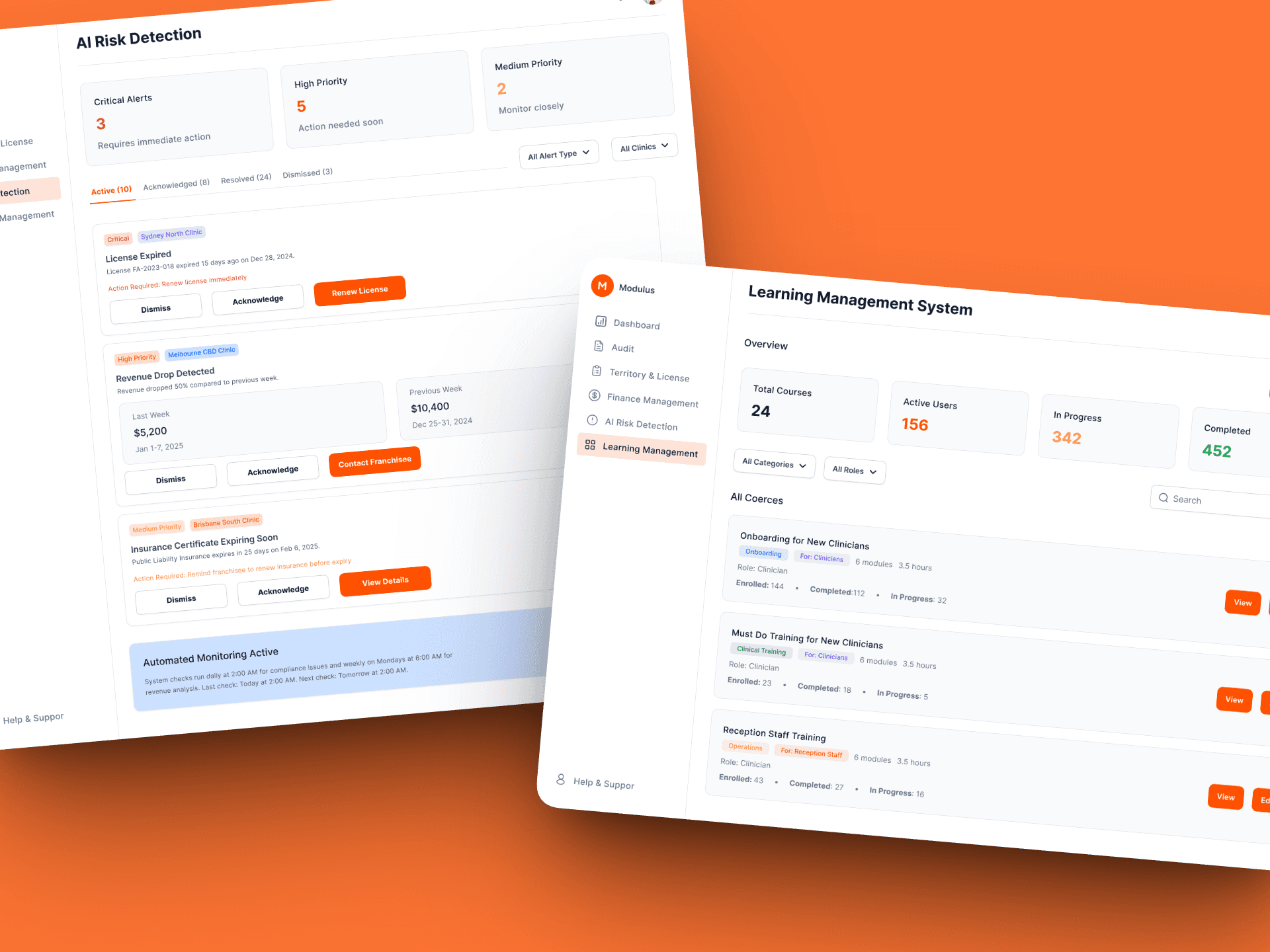
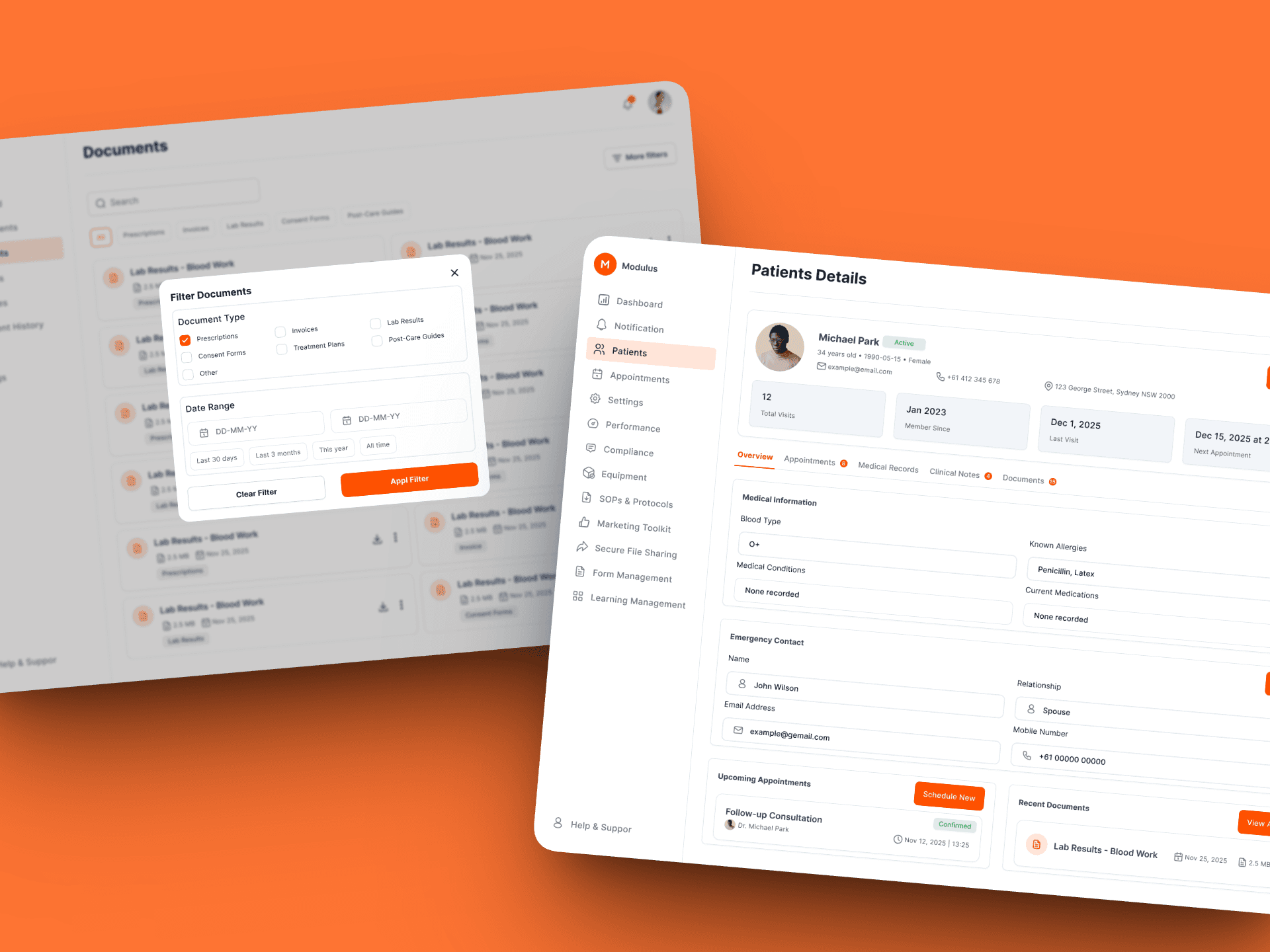
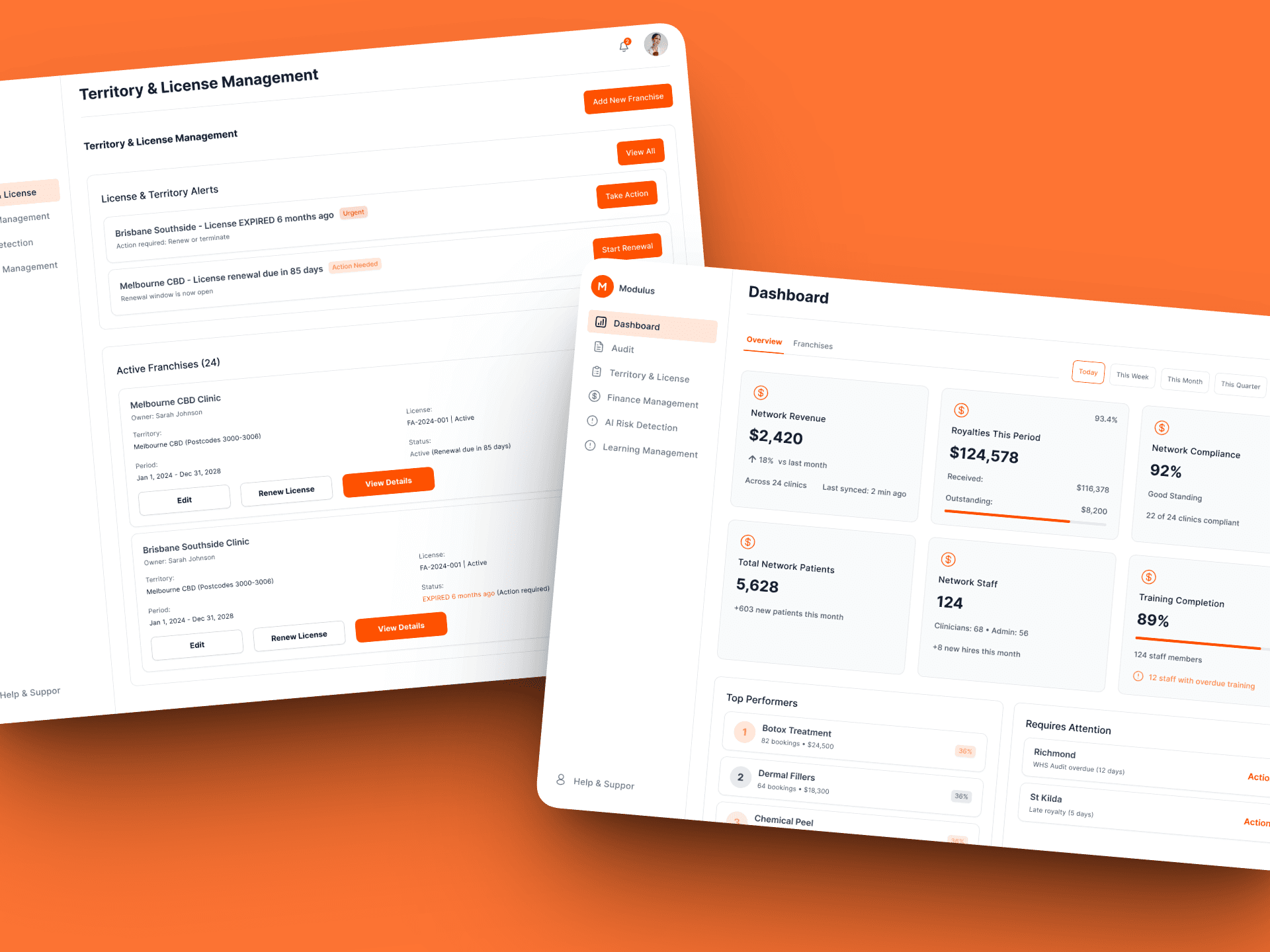
Screens from the Modulus Health platform we built.
Before
Held together by hand
Head office chased compliance documents from every clinic and had no real view of whether protocols were being followed. Patient paperwork was stored differently in every folder, desktop and inbox.
Head office
Compliance that checks itself
AI compliance monitoring reviews every clinic against the required standards, from licence documents and insurance certificates to training completions, and flags gaps before they become problems.
In the clinic
One record per patient
Every patient profile holds intake forms, treatment history, consent, photos, prescriptions, lab results and invoices. Clinicians build treatment plans in the platform and the right documents go to the patient’s portal.
The result
Runs in the background
Compliance reviews that took hours of manual work now run automatically. Every action is logged and every document is timestamped, so any record can be pulled in seconds.
Live
compliance checks across the network
1
auditable home for patient records
Real time
view of every clinic’s performance
Every
action logged and timestamped
“We came in with a clear internal tool idea and ShipFast helped us map workflows, refine scope, and ship fast. The system replaced manual admin work and has already saved our team a lot of time. The experience was smooth end to end.”
Andrew
Founder, Modulus Health
Your data
Patient data stays yours
Health information is the most sensitive data a practice holds. Here is exactly how we handle it.
Stays in your systems
We work inside the practice software and accounts you already use, with access you grant and can remove at any time.
NDA from the first call
Signed before you show us anything about your practice or your patients.
Never used for training
Nothing is trained on your patients’ information.
A clinician signs off
Every report and letter is a draft until a clinician reads, edits and signs it. Consent is recorded where it’s needed.
Access you control
Each automation can only reach what its job needs, and every action is logged so you can audit it.
Ready for the Privacy Act changes
From 10 December 2026 privacy policies must explain decisions software makes with personal information. We document what each automation decides.
Questions
Questions practice owners ask us
How does this save us money, or make us more?
Three ways. You don’t make the next admin hire, because the capacity comes from the system, not a new person. Your clinicians spend less time on paperwork and more on billable sessions. And fewer cancelled appointments sit empty. On the call we’ll put a dollar figure on it for your practice.
Is our patients’ data safe?
It stays in your own systems, hosted in your country/region. We sign an NDA before the first call, work under your access controls, and nothing about your patients is used to train any model. Consent and an audit log are built in.
We’re on Cliniko, Splose or Halaxy. Do we have to change?
No. We connect to what you already use. Ripping out your practice software is the fastest way to lose a year, so we don’t do it.
We already use an AI scribe. Is this the same thing?
No, and you should keep it. A scribe writes the note. We automate what happens after it: the referral, the report, the claim and the follow-up.
What if we already tried AI and it didn’t work?
Most practices tried a tool, not a build. A tool needs someone to fit it to your practice. That’s the part we do, and it’s why the guarantee is on hours saved, not on software installed.
Who owns what you build?
You own your data, your configuration and a permanent licence to everything we build for you. If you cancel, it keeps running. We keep the right to reuse what we learn for other practices, which is how we keep getting better at this.
Why one job at a time?
Because a practice can absorb one change a week and not five. Each job goes live, your team gets used to it, then we move to the next one. It’s slower on paper and faster in practice.
Do we get the system shown on this page?
No. You get a build made for your practice. The screens on this page are examples on sample data. We start by timing how your practice really runs, find where the hours leak, and build for that, around the software you already use. Two practices rarely end up with the same build.
Book a call
Book a 20-minute call. We’ll tell you straight whether the 20 hours are in your practice, and what they’re worth.
We take on three practices a quarter so the guarantees hold.
S
Shipfast
AI implementation partner for service businesses.
© 2026 Shipfast.agency. All rights reserved.